GLB polygon reduction with gltfpack
The triangle retention control sets how much of the original triangle count you want to keep. It is a target, not a promise. This page covers geometry simplification; it does not change texture size or encoding.
Start with a moderate target
Upload the original model, keep textures unchanged and set Target triangle retention to 50%. Leave the simplification error at its default 1%. Compare curved outlines, thin parts and holes before going lower. For models with several meshes, check each part rather than judging only the total count.
gltfpack -i input.glb -o output.glb -si 0.5 -kn -km -keWhy the target may not be reached
The error limit restricts acceptable simplification error. A stricter limit can stop reduction early. Open boundaries, attribute seams and the structure of small mesh parts can also leave fewer safe simplification choices. The website reports the measured result and possible causes; the engine does not identify one exact stopping reason.
Lock border vertices when separate pieces must keep matching open edges. This can help avoid gaps, but may leave more triangles. Test the assembled pieces after export; locking borders is not a guarantee that every visual seam remains unchanged.
Measured results on the ripple sample
| Simplification settings | Output triangles |
|---|---|
| Original mesh | 8,192 |
| 50% target, default error limit | 4,095 |
| 10% target, zero error, locked borders | 8,192 |
| 10% target, aggressive simplification | 812 |
The runs use the same original CC0 sample and native gltfpack 1.3. Triangle totals count each mesh primitive once. Results depend on the model, and a near-target count says nothing about whether the remaining shape is acceptable.
Compare the silhouette at the same angle
These images render the files in the table with the same camera, lighting and materials in Three.js 0.180.0. Open an image to inspect it at full size. Start with the outer lobes and the inner opening; do not judge the result from triangle counts alone.
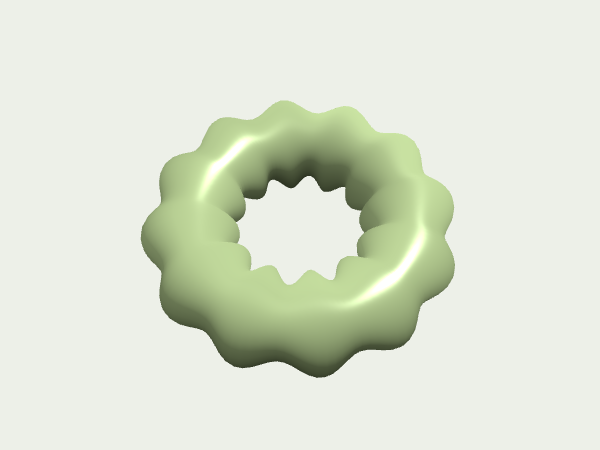
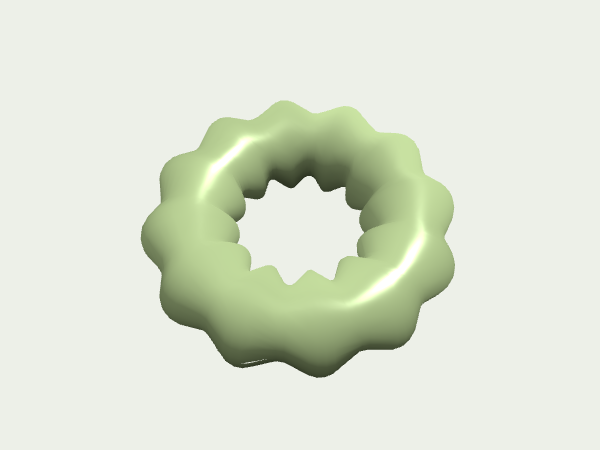
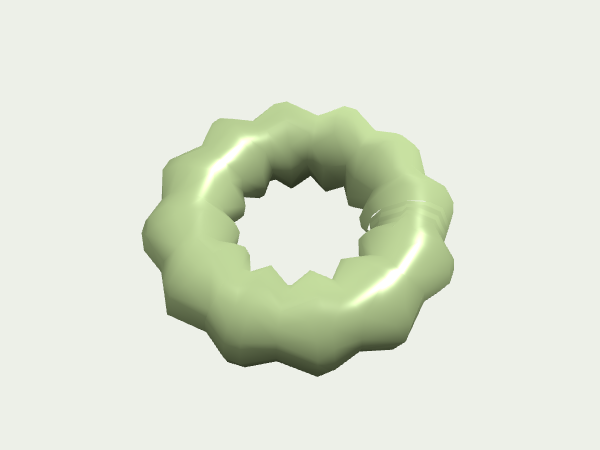
In the aggressive 10% result, the inner opening has visibly straighter segments and sharper corners. The outer lobes also lose some roundness. Those changes are easy to miss in a small thumbnail, even though the triangle target was reached.
This sample has no skinning or animation. A single view cannot reveal motion problems, hidden surfaces or every shading change. Rotate your own result and check it at its intended display size before accepting a lower triangle count.
Use aggressive simplification only after comparison
Aggressive simplification prioritizes the requested count and ignores the error limit. The interface disables the error field while this mode is active. Use it on a copy and inspect the silhouette and surface shading. It is not a quality-preserving shortcut for a difficult model.
gltfpack -i input.glb -o output.glb -si 0.1 -sa -kn -km -keIf fewer triangles barely reduce file size →
Engine reference: gltfpack
Open the optimizer ↗